# Create an Invoice
Creating invoices is essential for businesses to bill clients for services provided and maintain accurate financial records. This feature enables users to create detailed and professional invoices that include relevant billing information, terms, and payment instructions, facilitating transparent and efficient invoicing processes.
## Pre-conditions to use the Feature:
* Users **must have** an **account** in AgencyHandy.
* Users must be a part of an agency.
* Users **must be** **Super Admins/Admins/PMs** to create an invoice**.**
* At least **one client must exist**.
### Steps to Use:
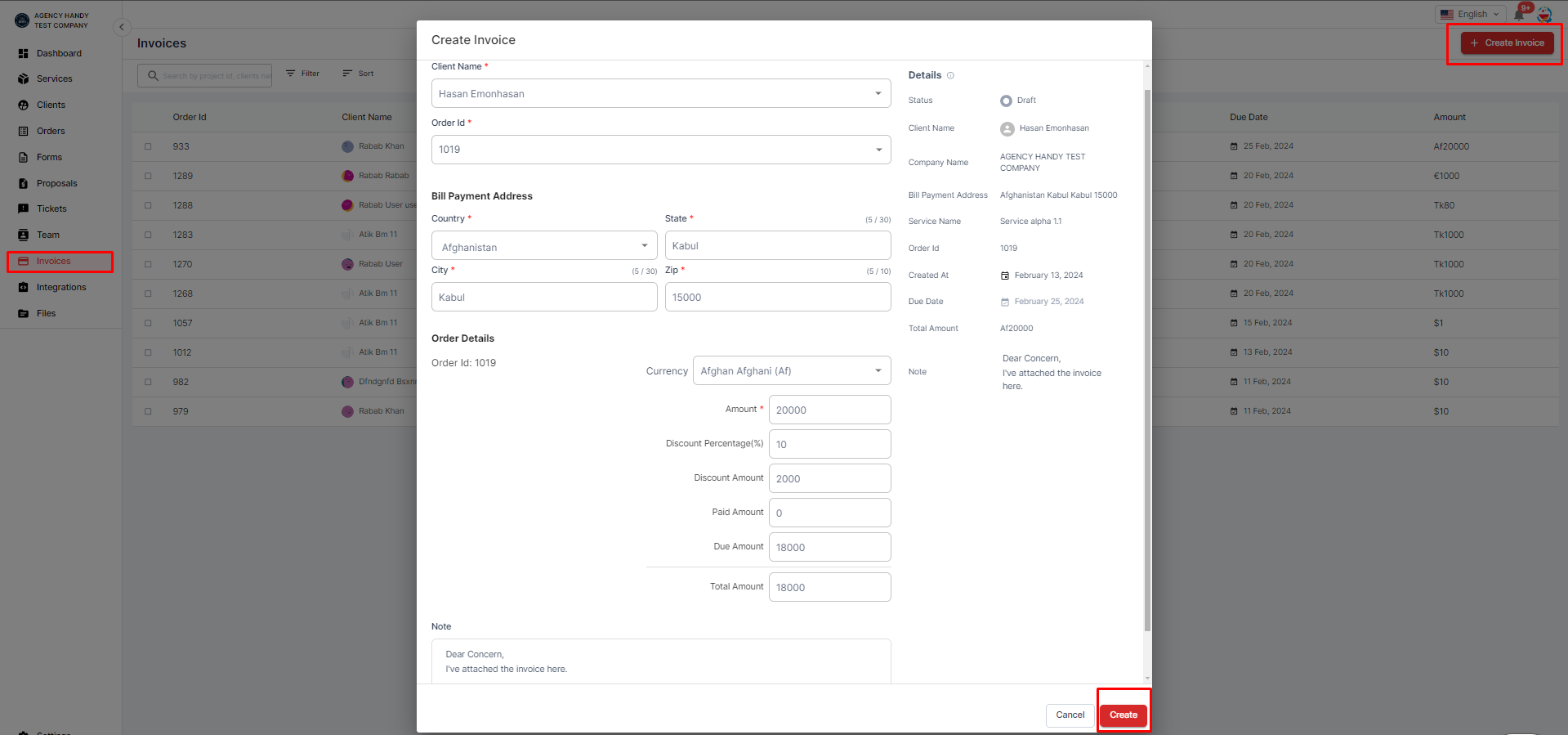
* **Log in to AgencyHandy:** Access your AgencyHandy account using your credentials. Navigate to Invoices: Locate the "Invoices" section in the dashboard menu.
* **Initiate a New Invoice:** Click the option to create a new invoice.
* **Select Client and Services:** Choose the client for whom the invoice is being generated and select the services provided from the available options.
* **Enter Invoice Details:** Fill in the invoice details, including invoice number, issue date, due date, billing period, and other relevant information.
* Here's an outline of how this form operates:
1. **Invoice Creation**:
* **Client Selection**: To initiate an invoice, select the client's name from a designated list (Required).
* **Order ID**: The order ID is another essential field that links the invoice to the specific order. Select the specific Order ID (Required).
2. **Bill Payment Address**:
* Specify the bill payment address by selecting the country, city, and state and entering the zip code, which helps ensure accurate billing.
3. **Order Details**:
* Under this section, various financial aspects of the order are detailed, including
* Order ID - Amount: Associate the monetary value with the order.
* Currency: Select the currency in which you want to be paid.
* Discount Percentage and Amount: If any discounts are applicable, mention them here.
* Paid Amount: Mention the amount that has already been paid.
* Due Amount: Mention the amount that is yet to be paid.
* Total Amount: Mention the complete payable amount for the order.
4. **Note (Optional)**:
* Add any additional notes pertinent to the invoice.
5. **Details**:
* This section encapsulates:
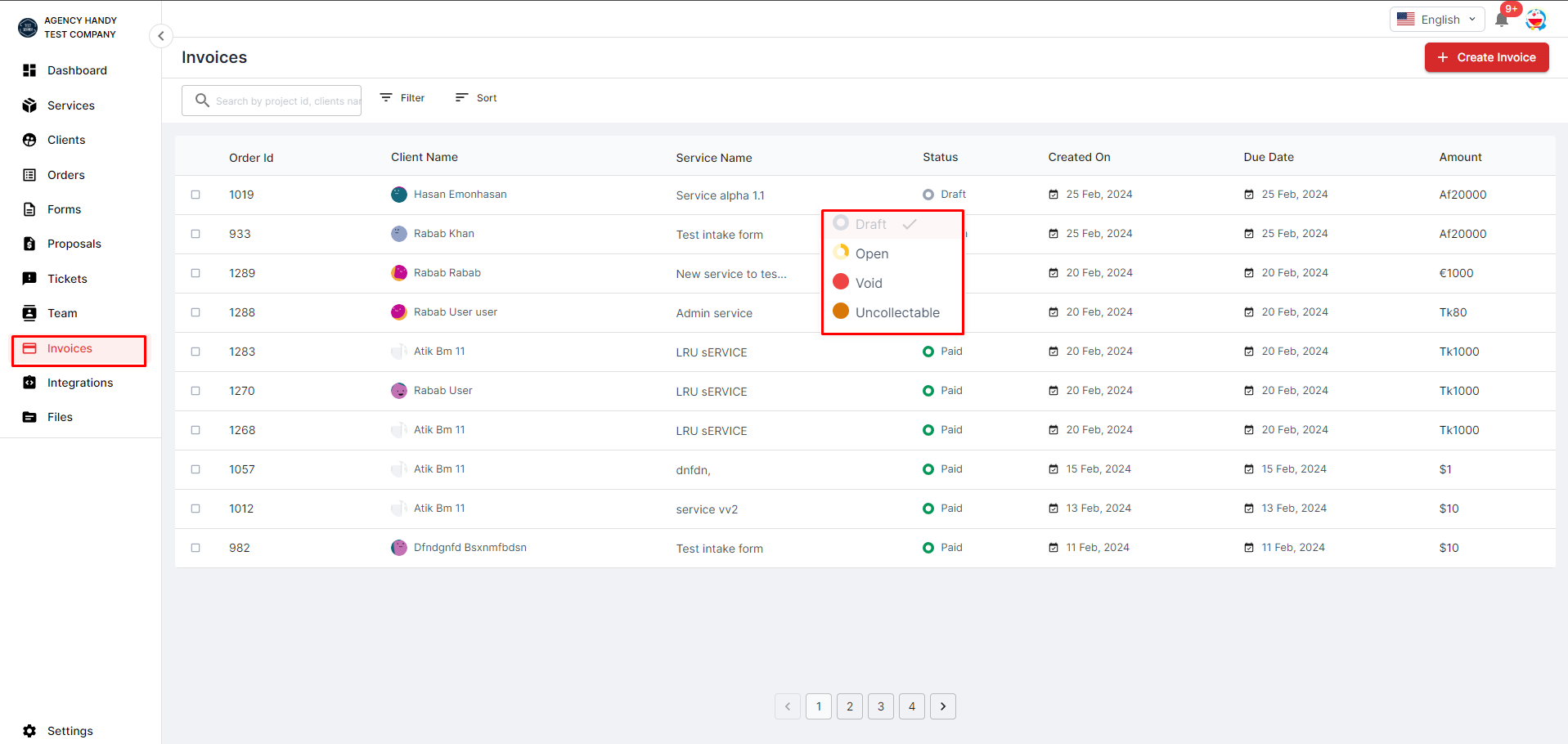
* Status of the Invoice: Whether draft, open, void, or uncollectable.
* Client Name, Company Name, and Address: Essential client information for record-keeping.
* Bill Payment Address: The address where the payment should be sent.
* Service Name: The name of the service provided.
* Order ID: The unique identifier for the order.
* Created at: The date when the invoice was created.
* Due Date: The deadline for the payment.
* Total Amount: The final amount payable.
* **Preview Invoice:** Review the completed invoice to ensure accuracy and completeness.
* **Send Invoice:** Once the invoice is finalized, send it to the client via email or other communication channels directly from AgencyHandy.
* **Track Invoice Status:** Monitor the status of the invoice, including whether it has been viewed, paid, or overdue, to facilitate timely follow-up and payment reconciliation.
### Important Notes:
* **Only** the **agency creates** the **invoice**.
* Once the **invoice is created** the **status** is **Draft** by **default**.
* **The agency sends** the **invoice** to the **client** by **clicking** the **Send to Client** button, which will **change** the **status** to **Open**.
* **The agency** can **change** the **status** from **open** status to **paid, void, or uncollectable.**
* The **client** can **only view** the generated **invoice**.
* **Both parties** can **download** the **invoice**.
* The **invoice** **contains** - **the created date, paid date,/Void date**.
* The **invoice** is **shown** along **with the service.**
* **When** the **status** is **changed** to **paid/void**, the **system** **takes** the **‘paid date’ automatically.**
* The **agency logo** and **address** are **added** to the **invoice** by the **system**.
* **Status details:**
*
```
**Draft**
```
```
* The invoice isn’t ready to use. All invoices start in draft status.
* The agency can edit any part of the invoice.
* When the invoice is ready to use, finalize it by changing its status to open.
* If the invoice isn’t associated with a subscription, the agency can delete it.
**Open/Unpaid**
* The invoice is finalized and awaiting payment.
* The agency can send the invoice to a customer for payment.
* The agency can change the invoice’s status to paid, void, or uncollectible.
**Paid**
* The Invoice is paid
**Void**
* The invoice is canceled.
**Uncollectable**
* The customer is unlikely to pay the invoice.
* Usually, you treat it as bad debt in your accounting process.
```